Showing posts with label 12c. Show all posts
Showing posts with label 12c. Show all posts
Wednesday, August 23, 2017
Friday, August 18, 2017
auto dbstart stop in centos 7 (systemd)
a nice article, followed and works perfectly.
tested on 12.2c on centos 7.3
Only place to replaced is the ORACLE_BASE AND ORACLE_HOME according to my env.
[root@hmc-P55A-UD3 system]# ps -ef |grep tns
root 28 2 0 06:53 ? 00:00:00 [netns]
root 5336 4752 0 07:20 pts/0 00:00:00 grep --color=auto tns
[root@hmc-P55A-UD3 system]# ps -ef |grep pmon
root 5435 4752 0 07:20 pts/0 00:00:00 grep --color=auto pmon
[root@hmc-P55A-UD3 system]# systemctl start oracle_network.service
[root@hmc-P55A-UD3 system]# ps -ef |grep tns
root 28 2 0 06:53 ? 00:00:00 [netns]
oracle 5449 1 0 07:20 ? 00:00:00 /app/oracle/product/12.2.0/dbhome_1/bin/tnslsnr LISTENER -inherit
root 5456 4752 0 07:20 pts/0 00:00:00 grep --color=auto tns
[root@hmc-P55A-UD3 system]# systemctl start oracledb
[root@hmc-P55A-UD3 system]# systemctl status oracledb
● oracledb.service - Oracle databases service
Loaded: loaded (/usr/lib/systemd/system/oracledb.service; enabled; vendor preset: disabled)
Active: active (running) since Fri 2017-08-18 07:20:49 EDT; 16s ago
Process: 5463 ExecStart=/app/oracle/product/12.2.0/dbhome_1/bin/dbstart /app/oracle/product/12.2.0/dbhome_1 (code=exited, status=0/SUCCESS)
CGroup: /system.slice/oracledb.service
├─5564 ora_pmon_orcl
├─5566 ora_clmn_orcl
├─5568 ora_psp0_orcl
├─5570 ora_vktm_orcl
├─5574 ora_gen0_orcl
├─5576 ora_mman_orcl
├─5580 ora_gen1_orcl
├─5584 ora_diag_orcl
├─5586 ora_ofsd_orcl
├─5590 ora_dbrm_orcl
├─5592 ora_vkrm_orcl
├─5594 ora_svcb_orcl
├─5596 ora_pman_orcl
├─5598 ora_dia0_orcl
├─5600 ora_dbw0_orcl
├─5602 ora_lgwr_orcl
├─5604 ora_ckpt_orcl
├─5606 ora_lg00_orcl
├─5608 ora_smon_orcl
├─5610 ora_lg01_orcl
├─5612 ora_smco_orcl
├─5615 ora_reco_orcl
├─5617 ora_w000_orcl
├─5619 ora_lreg_orcl
├─5621 ora_w001_orcl
├─5623 ora_pxmn_orcl
├─5627 ora_mmon_orcl
├─5629 ora_mmnl_orcl
├─5631 ora_d000_orcl
├─5633 ora_s000_orcl
├─5635 ora_tmon_orcl
├─5645 ora_tt00_orcl
├─5647 ora_tt01_orcl
├─5649 ora_tt02_orcl
├─5653 ora_aqpc_orcl
├─5657 ora_p000_orcl
├─5659 ora_p001_orcl
├─5661 ora_p002_orcl
├─5663 ora_p003_orcl
├─5665 ora_p004_orcl
├─5667 ora_p005_orcl
├─5669 ora_p006_orcl
├─5671 ora_p007_orcl
├─5673 ora_p008_orcl
├─5675 ora_p009_orcl
├─5677 ora_p00a_orcl
├─5679 ora_p00b_orcl
├─5681 ora_p00c_orcl
├─5683 ora_p00d_orcl
├─5685 ora_p00e_orcl
├─5687 ora_p00f_orcl
├─5841 ora_cjq0_orcl
├─5962 ora_j000_orcl
├─5964 ora_j001_orcl
├─5966 ora_s001_orcl
├─5968 ora_qm02_orcl
├─5970 ora_qm03_orcl
├─5972 ora_q002_orcl
├─5974 ora_q003_orcl
└─5976 ora_q004_orcl
Aug 18 07:20:38 hmc-P55A-UD3 systemd[1]: Starting Oracle databases service...
Aug 18 07:20:38 hmc-P55A-UD3 dbstart[5463]: Processing Database instance "orcl": log file /app/oracle/product/12.2.0/dbhome_1/startup.log
Aug 18 07:20:49 hmc-P55A-UD3 systemd[1]: Started Oracle databases service.
[root@hmc-P55A-UD3 system]# systemctl stop oracledb
[oracle@hmc-P55A-UD3 bin]$ ps -ef |grep pmon
oracle 6147 4949 0 07:22 pts/1 00:00:00 grep --color=auto pmon
[oracle@hmc-P55A-UD3 bin]$ ps -ef |grep tns
root 28 2 0 06:53 ? 00:00:00 [netns]
oracle 6152 4949 0 07:22 pts/1 00:00:00 grep --color=auto tns
tested on 12.2c on centos 7.3
Only place to replaced is the ORACLE_BASE AND ORACLE_HOME according to my env.
[root@hmc-P55A-UD3 system]# ps -ef |grep tns
root 28 2 0 06:53 ? 00:00:00 [netns]
root 5336 4752 0 07:20 pts/0 00:00:00 grep --color=auto tns
[root@hmc-P55A-UD3 system]# ps -ef |grep pmon
root 5435 4752 0 07:20 pts/0 00:00:00 grep --color=auto pmon
[root@hmc-P55A-UD3 system]# systemctl start oracle_network.service
[root@hmc-P55A-UD3 system]# ps -ef |grep tns
root 28 2 0 06:53 ? 00:00:00 [netns]
oracle 5449 1 0 07:20 ? 00:00:00 /app/oracle/product/12.2.0/dbhome_1/bin/tnslsnr LISTENER -inherit
root 5456 4752 0 07:20 pts/0 00:00:00 grep --color=auto tns
[root@hmc-P55A-UD3 system]# systemctl start oracledb
[root@hmc-P55A-UD3 system]# systemctl status oracledb
● oracledb.service - Oracle databases service
Loaded: loaded (/usr/lib/systemd/system/oracledb.service; enabled; vendor preset: disabled)
Active: active (running) since Fri 2017-08-18 07:20:49 EDT; 16s ago
Process: 5463 ExecStart=/app/oracle/product/12.2.0/dbhome_1/bin/dbstart /app/oracle/product/12.2.0/dbhome_1 (code=exited, status=0/SUCCESS)
CGroup: /system.slice/oracledb.service
├─5564 ora_pmon_orcl
├─5566 ora_clmn_orcl
├─5568 ora_psp0_orcl
├─5570 ora_vktm_orcl
├─5574 ora_gen0_orcl
├─5576 ora_mman_orcl
├─5580 ora_gen1_orcl
├─5584 ora_diag_orcl
├─5586 ora_ofsd_orcl
├─5590 ora_dbrm_orcl
├─5592 ora_vkrm_orcl
├─5594 ora_svcb_orcl
├─5596 ora_pman_orcl
├─5598 ora_dia0_orcl
├─5600 ora_dbw0_orcl
├─5602 ora_lgwr_orcl
├─5604 ora_ckpt_orcl
├─5606 ora_lg00_orcl
├─5608 ora_smon_orcl
├─5610 ora_lg01_orcl
├─5612 ora_smco_orcl
├─5615 ora_reco_orcl
├─5617 ora_w000_orcl
├─5619 ora_lreg_orcl
├─5621 ora_w001_orcl
├─5623 ora_pxmn_orcl
├─5627 ora_mmon_orcl
├─5629 ora_mmnl_orcl
├─5631 ora_d000_orcl
├─5633 ora_s000_orcl
├─5635 ora_tmon_orcl
├─5645 ora_tt00_orcl
├─5647 ora_tt01_orcl
├─5649 ora_tt02_orcl
├─5653 ora_aqpc_orcl
├─5657 ora_p000_orcl
├─5659 ora_p001_orcl
├─5661 ora_p002_orcl
├─5663 ora_p003_orcl
├─5665 ora_p004_orcl
├─5667 ora_p005_orcl
├─5669 ora_p006_orcl
├─5671 ora_p007_orcl
├─5673 ora_p008_orcl
├─5675 ora_p009_orcl
├─5677 ora_p00a_orcl
├─5679 ora_p00b_orcl
├─5681 ora_p00c_orcl
├─5683 ora_p00d_orcl
├─5685 ora_p00e_orcl
├─5687 ora_p00f_orcl
├─5841 ora_cjq0_orcl
├─5962 ora_j000_orcl
├─5964 ora_j001_orcl
├─5966 ora_s001_orcl
├─5968 ora_qm02_orcl
├─5970 ora_qm03_orcl
├─5972 ora_q002_orcl
├─5974 ora_q003_orcl
└─5976 ora_q004_orcl
Aug 18 07:20:38 hmc-P55A-UD3 systemd[1]: Starting Oracle databases service...
Aug 18 07:20:38 hmc-P55A-UD3 dbstart[5463]: Processing Database instance "orcl": log file /app/oracle/product/12.2.0/dbhome_1/startup.log
Aug 18 07:20:49 hmc-P55A-UD3 systemd[1]: Started Oracle databases service.
[root@hmc-P55A-UD3 system]# systemctl stop oracledb
[oracle@hmc-P55A-UD3 bin]$ ps -ef |grep pmon
oracle 6147 4949 0 07:22 pts/1 00:00:00 grep --color=auto pmon
[oracle@hmc-P55A-UD3 bin]$ ps -ef |grep tns
root 28 2 0 06:53 ? 00:00:00 [netns]
oracle 6152 4949 0 07:22 pts/1 00:00:00 grep --color=auto tns

Monday, May 15, 2017
spare6 in sys.use$
Security related values in the 12c SYS.USER$ table are
CTIME: Date & Time when user was created
PTIME: Date & Time when user password was last changed
LTIME: Date & Time when the user account was locked
LCOUNT: Number of failed login attempts
Added in Oracle Database 12c:
SPARE6: Last login time of the user.
CTIME: Date & Time when user was created
PTIME: Date & Time when user password was last changed
LTIME: Date & Time when the user account was locked
LCOUNT: Number of failed login attempts
Added in Oracle Database 12c:
SPARE6: Last login time of the user.
Thursday, May 04, 2017
12.2c dbua complains 10G version password being used
since dbua complains, and I checked the 12.1 database to be upgraded.
"In exclusive mode, accounts which oly have the 10G password version (see DBA_USERS.PASSWORD_VERSIONS)" ...
There is one account RMAN somehow is having 10G version password.
SQL> select username, password_versions from dba_users where username='RMAN';
USERNAME
--------------------------------------------------------------------------------
PASSWORD_VER
------------
RMAN
10G
although the parameter sensitive is already true, set the minimum allowed version in sqlnet.ora (SQLNET.ALLOWD_LOGON_VERSION_SERVER) to 10. but still not worked for me.

Finally, solution worked for me is to change its password manually.
SQL> password
Changing password for RMAN
Old password:
New password:
Retype new password:
Password changed
SQL> select username, password_versions from dba_users where username='RMAN';
USERNAME
--------------------------------------------------------------------------------
PASSWORD_VER
------------
RMAN
10G 11G 12C
SQL> password
Changing password for RMAN
Old password:
New password:
Retype new password:
Password changed
SQL> select username, password_versions from dba_users where username='RMAN';
USERNAME
--------------------------------------------------------------------------------
PASSWORD_VER
------------
RMAN
10G 11G 12C
"In exclusive mode, accounts which oly have the 10G password version (see DBA_USERS.PASSWORD_VERSIONS)" ...
There is one account RMAN somehow is having 10G version password.
SQL> select username, password_versions from dba_users where username='RMAN';
USERNAME
--------------------------------------------------------------------------------
PASSWORD_VER
------------
RMAN
10G
although the parameter sensitive is already true, set the minimum allowed version in sqlnet.ora (SQLNET.ALLOWD_LOGON_VERSION_SERVER) to 10. but still not worked for me.

Finally, solution worked for me is to change its password manually.
SQL> password
Changing password for RMAN
Old password:
New password:
Retype new password:
Password changed
SQL> select username, password_versions from dba_users where username='RMAN';
USERNAME
--------------------------------------------------------------------------------
PASSWORD_VER
------------
RMAN
10G 11G 12C
SQL> password
Changing password for RMAN
Old password:
New password:
Retype new password:
Password changed
SQL> select username, password_versions from dba_users where username='RMAN';
USERNAME
--------------------------------------------------------------------------------
PASSWORD_VER
------------
RMAN
10G 11G 12C
ORA-04045 Errors And ORA-01031 during 12.2 DB upgrade via dbua
notice this in alert.log while running dbua.
ORA-12012: error on auto execute of job "APEX_050000"."ORACLE_APEX_MAIL_QUEUE"
ORA-04045: errors during recompilation/revalidation of RMAN.VPC_CONTEXT_TRG
ORA-01031: insufficient privileges
after upgrade, notice the object is invalid.
As this a RMAN catalog database, I will need to upgrade the catalog too.
connect catalog database as RMAN schema
> rman target /
Recovery Manager: Release 12.2.0.1.0 - Production on Thu May 4 19:14:10 2017
Copyright (c) 1982, 2017, Oracle and/or its affiliates. All rights reserved.
connected to target database: RCATT (DBID=4101766741)
RMAN> connect catalog rman@rcatpdb1
recovery catalog database Password:
connected to recovery catalog database
PL/SQL package RMAN.DBMS_RCVCAT version 12.01.00.02. in RCVCAT database is too old
RMAN> upgrade catalog;
recovery catalog owner is RMAN
enter UPGRADE CATALOG command again to confirm catalog upgrade
RMAN> upgrade catalog;
recovery catalog upgraded to version 12.02.00.01
DBMS_RCVMAN package upgraded to version 12.02.00.01
DBMS_RCVCAT package upgraded to version 12.02.00.01.
check invalid object again, and now no more invalid objects.
ORA-12012: error on auto execute of job "APEX_050000"."ORACLE_APEX_MAIL_QUEUE"
ORA-04045: errors during recompilation/revalidation of RMAN.VPC_CONTEXT_TRG
ORA-01031: insufficient privileges
after upgrade, notice the object is invalid.
As this a RMAN catalog database, I will need to upgrade the catalog too.
connect catalog database as RMAN schema
> rman target /
Recovery Manager: Release 12.2.0.1.0 - Production on Thu May 4 19:14:10 2017
Copyright (c) 1982, 2017, Oracle and/or its affiliates. All rights reserved.
connected to target database: RCATT (DBID=4101766741)
RMAN> connect catalog rman@rcatpdb1
recovery catalog database Password:
connected to recovery catalog database
PL/SQL package RMAN.DBMS_RCVCAT version 12.01.00.02. in RCVCAT database is too old
RMAN> upgrade catalog;
recovery catalog owner is RMAN
enter UPGRADE CATALOG command again to confirm catalog upgrade
RMAN> upgrade catalog;
recovery catalog upgraded to version 12.02.00.01
DBMS_RCVMAN package upgraded to version 12.02.00.01
DBMS_RCVCAT package upgraded to version 12.02.00.01.
check invalid object again, and now no more invalid objects.
Friday, April 15, 2016
12c multitenant database backupset location
Organize a chart based on below full list of backup information.

Note that if BACKUP OPTIMIZATION is turned on , the seeds files then are backed up once only.
Appendix
RMAN> list backupset;
List of Backup Sets
===================
BS Key Type LV Size Device Type Elapsed Time Completion Time
------- ---- -- ---------- ----------- ------------ --------------------
133 Full 4.34M DISK 00:00:02 2016-APR-12 10:06:04
BP Key: 133 Status: AVAILABLE Compressed: YES Tag: TAG20160412T100602
Piece Name: /rman001/oradata/fast_recovery_area/RCATT/backupset/2016_04_12/o1_mf_nnndf_TAG20160412T100602_cjrp0bls_.bkp
List of Datafiles in backup set 133
File LV Type Ckp SCN Ckp Time Name
---- -- ---- ---------- -------------------- ----
5 Full 4542086 2016-APR-12 10:06:02 /rman001/oradata/RCATT/undotbs01.dbf
BS Key Type LV Size Device Type Elapsed Time Completion Time
------- ---- -- ---------- ----------- ------------ --------------------
134 Full 189.24M DISK 00:00:57 2016-APR-12 10:07:02
BP Key: 134 Status: AVAILABLE Compressed: YES Tag: TAG20160412T100602
Piece Name: /rman001/oradata/fast_recovery_area/RCATT/backupset/2016_04_12/o1_mf_nnndf_TAG20160412T100602_cjrp0ftk_.bkp
List of Datafiles in backup set 134
File LV Type Ckp SCN Ckp Time Name
---- -- ---- ---------- -------------------- ----
1 Full 4542088 2016-APR-12 10:06:05 /rman001/oradata/RCATT/system01.dbf
BS Key Type LV Size Device Type Elapsed Time Completion Time
------- ---- -- ---------- ----------- ------------ --------------------
135 Full 200.26M DISK 00:01:08 2016-APR-12 10:07:10
BP Key: 135 Status: AVAILABLE Compressed: YES Tag: TAG20160412T100602
Piece Name: /rman001/oradata/fast_recovery_area/RCATT/backupset/2016_04_12/o1_mf_nnndf_TAG20160412T100602_cjrp0blb_.bkp
List of Datafiles in backup set 135
File LV Type Ckp SCN Ckp Time Name
---- -- ---- ---------- -------------------- ----
3 Full 4542084 2016-APR-12 10:06:02 /rman001/oradata/RCATT/sysaux01.dbf
BS Key Type LV Size Device Type Elapsed Time Completion Time
------- ---- -- ---------- ----------- ------------ --------------------
136 Full 102.60M DISK 00:00:34 2016-APR-12 10:07:45
BP Key: 136 Status: AVAILABLE Compressed: YES Tag: TAG20160412T100602
Piece Name: /rman001/oradata/fast_recovery_area/RCATT/2D960D0F8745635EE05400144FF8A527/backupset/2016_04_12/o1_mf_nnndf_TAG20160412T100602_cjrp2hj0_.bkp
List of Datafiles in backup set 136
Container ID: 2, PDB Name: PDB$SEED
File LV Type Ckp SCN Ckp Time Name
---- -- ---- ---------- -------------------- ----
4 Full 2043027 2016-MAR-09 14:26:29 /rman001/oradata/RCATT/pdbseed/sysaux01.dbf
BS Key Type LV Size Device Type Elapsed Time Completion Time
------- ---- -- ---------- ----------- ------------ --------------------
137 Full 110.38M DISK 00:00:37 2016-APR-12 10:07:48
BP Key: 137 Status: AVAILABLE Compressed: YES Tag: TAG20160412T100602
Piece Name: /rman001/oradata/fast_recovery_area/RCATT/2D98C99BF6722388E05400144FF8A527/backupset/2016_04_12/o1_mf_nnndf_TAG20160412T100602_cjrp2h52_.bkp
List of Datafiles in backup set 137
Container ID: 3, PDB Name: RCATPDB1
File LV Type Ckp SCN Ckp Time Name
---- -- ---- ---------- -------------------- ----
8 Full 4542112 2016-APR-12 10:07:11 /rman001/oradata/RCATT/RCATPDB1/sysaux01.dbf
BS Key Type LV Size Device Type Elapsed Time Completion Time
------- ---- -- ---------- ----------- ------------ --------------------
138 Full 47.09M DISK 00:00:16 2016-APR-12 10:08:02
BP Key: 138 Status: AVAILABLE Compressed: YES Tag: TAG20160412T100602
Piece Name: /rman001/oradata/fast_recovery_area/RCATT/2D98C99BF6722388E05400144FF8A527/backupset/2016_04_12/o1_mf_nnndf_TAG20160412T100602_cjrp3lw2_.bkp
List of Datafiles in backup set 138
Container ID: 3, PDB Name: RCATPDB1
File LV Type Ckp SCN Ckp Time Name
---- -- ---- ---------- -------------------- ----
7 Full 4542130 2016-APR-12 10:07:46 /rman001/oradata/RCATT/RCATPDB1/system01.dbf
BS Key Type LV Size Device Type Elapsed Time Completion Time
------- ---- -- ---------- ----------- ------------ --------------------
139 Full 43.30M DISK 00:00:14 2016-APR-12 10:08:04
BP Key: 139 Status: AVAILABLE Compressed: YES Tag: TAG20160412T100602
Piece Name: /rman001/oradata/fast_recovery_area/RCATT/2D960D0F8745635EE05400144FF8A527/backupset/2016_04_12/o1_mf_nnndf_TAG20160412T100602_cjrp3p2s_.bkp
List of Datafiles in backup set 139
Container ID: 2, PDB Name: PDB$SEED
File LV Type Ckp SCN Ckp Time Name
---- -- ---- ---------- -------------------- ----
2 Full 2043027 2016-MAR-09 14:26:29 /rman001/oradata/RCATT/pdbseed/system01.dbf
BS Key Type LV Size Device Type Elapsed Time Completion Time
------- ---- -- ---------- ----------- ------------ --------------------
140 Full 1.06M DISK 00:00:00 2016-APR-12 10:08:05
BP Key: 140 Status: AVAILABLE Compressed: YES Tag: TAG20160412T100602
Piece Name: /rman001/oradata/fast_recovery_area/RCATT/backupset/2016_04_12/o1_mf_nnndf_TAG20160412T100602_cjrp45tc_.bkp
List of Datafiles in backup set 140
File LV Type Ckp SCN Ckp Time Name
---- -- ---- ---------- -------------------- ----
6 Full 4542138 2016-APR-12 10:08:05 /rman001/oradata/RCATT/users01.dbf
BS Key Type LV Size Device Type Elapsed Time Completion Time
------- ---- -- ---------- ----------- ------------ --------------------
141 Full 9.34M DISK 00:00:03 2016-APR-12 10:08:08
BP Key: 141 Status: AVAILABLE Compressed: YES Tag: TAG20160412T100602
Piece Name: /rman001/oradata/fast_recovery_area/RCATT/2D98C99BF6722388E05400144FF8A527/backupset/2016_04_12/o1_mf_nnndf_TAG20160412T100602_cjrp45cf_.bkp
List of Datafiles in backup set 141
Container ID: 3, PDB Name: RCATPDB1
File LV Type Ckp SCN Ckp Time Name
---- -- ---- ---------- -------------------- ----
9 Full 4542137 2016-APR-12 10:08:05 /rman001/oradata/RCATT/RCATPDB1/RCATPDB1_users01.dbf
BS Key Size Device Type Elapsed Time Completion Time
------- ---------- ----------- ------------ --------------------
143 2.50K DISK 00:00:00 2016-APR-12 10:08:11
BP Key: 143 Status: AVAILABLE Compressed: YES Tag: TAG20160412T100811
Piece Name: /rman001/oradata/fast_recovery_area/RCATT/backupset/2016_04_12/o1_mf_annnn_TAG20160412T100811_cjrp4cmh_.bkp
List of Archived Logs in backup set 143
Thrd Seq Low SCN Low Time Next SCN Next Time
---- ------- ---------- -------------------- ---------- ---------
1 442 4542164 2016-APR-12 10:08:10 4542172 2016-APR-12 10:08:11
BS Key Size Device Type Elapsed Time Completion Time
------- ---------- ----------- ------------ --------------------
144 1.70M DISK 00:00:00 2016-APR-12 10:08:11
BP Key: 144 Status: AVAILABLE Compressed: YES Tag: TAG20160412T100811
Piece Name: /rman001/oradata/fast_recovery_area/RCATT/backupset/2016_04_12/o1_mf_annnn_TAG20160412T100811_cjrp4cl8_.bkp
List of Archived Logs in backup set 144
Thrd Seq Low SCN Low Time Next SCN Next Time
---- ------- ---------- -------------------- ---------- ---------
1 441 4541226 2016-APR-12 09:56:17 4542164 2016-APR-12 10:08:10
BS Key Type LV Size Device Type Elapsed Time Completion Time
------- ---- -- ---------- ----------- ------------ --------------------
145 Full 17.30M DISK 00:00:01 2016-APR-12 10:08:13
BP Key: 145 Status: AVAILABLE Compressed: NO Tag: TAG20160412T100812
Piece Name: /rman001/oradata/fast_recovery_area/RCATT/autobackup/2016_04_12/o1_mf_s_908964492_cjrp4f6j_.bkp
SPFILE Included: Modification time: 2016-APR-09 07:07:00
SPFILE db_unique_name: RCATT
Control File Included: Ckp SCN: 4542190 Ckp time: 2016-APR-12 10:08:12

Note that if BACKUP OPTIMIZATION is turned on , the seeds files then are backed up once only.
Appendix
RMAN> list backupset;
List of Backup Sets
===================
BS Key Type LV Size Device Type Elapsed Time Completion Time
------- ---- -- ---------- ----------- ------------ --------------------
133 Full 4.34M DISK 00:00:02 2016-APR-12 10:06:04
BP Key: 133 Status: AVAILABLE Compressed: YES Tag: TAG20160412T100602
Piece Name: /rman001/oradata/fast_recovery_area/RCATT/backupset/2016_04_12/o1_mf_nnndf_TAG20160412T100602_cjrp0bls_.bkp
List of Datafiles in backup set 133
File LV Type Ckp SCN Ckp Time Name
---- -- ---- ---------- -------------------- ----
5 Full 4542086 2016-APR-12 10:06:02 /rman001/oradata/RCATT/undotbs01.dbf
BS Key Type LV Size Device Type Elapsed Time Completion Time
------- ---- -- ---------- ----------- ------------ --------------------
134 Full 189.24M DISK 00:00:57 2016-APR-12 10:07:02
BP Key: 134 Status: AVAILABLE Compressed: YES Tag: TAG20160412T100602
Piece Name: /rman001/oradata/fast_recovery_area/RCATT/backupset/2016_04_12/o1_mf_nnndf_TAG20160412T100602_cjrp0ftk_.bkp
List of Datafiles in backup set 134
File LV Type Ckp SCN Ckp Time Name
---- -- ---- ---------- -------------------- ----
1 Full 4542088 2016-APR-12 10:06:05 /rman001/oradata/RCATT/system01.dbf
BS Key Type LV Size Device Type Elapsed Time Completion Time
------- ---- -- ---------- ----------- ------------ --------------------
135 Full 200.26M DISK 00:01:08 2016-APR-12 10:07:10
BP Key: 135 Status: AVAILABLE Compressed: YES Tag: TAG20160412T100602
Piece Name: /rman001/oradata/fast_recovery_area/RCATT/backupset/2016_04_12/o1_mf_nnndf_TAG20160412T100602_cjrp0blb_.bkp
List of Datafiles in backup set 135
File LV Type Ckp SCN Ckp Time Name
---- -- ---- ---------- -------------------- ----
3 Full 4542084 2016-APR-12 10:06:02 /rman001/oradata/RCATT/sysaux01.dbf
BS Key Type LV Size Device Type Elapsed Time Completion Time
------- ---- -- ---------- ----------- ------------ --------------------
136 Full 102.60M DISK 00:00:34 2016-APR-12 10:07:45
BP Key: 136 Status: AVAILABLE Compressed: YES Tag: TAG20160412T100602
Piece Name: /rman001/oradata/fast_recovery_area/RCATT/2D960D0F8745635EE05400144FF8A527/backupset/2016_04_12/o1_mf_nnndf_TAG20160412T100602_cjrp2hj0_.bkp
List of Datafiles in backup set 136
Container ID: 2, PDB Name: PDB$SEED
File LV Type Ckp SCN Ckp Time Name
---- -- ---- ---------- -------------------- ----
4 Full 2043027 2016-MAR-09 14:26:29 /rman001/oradata/RCATT/pdbseed/sysaux01.dbf
BS Key Type LV Size Device Type Elapsed Time Completion Time
------- ---- -- ---------- ----------- ------------ --------------------
137 Full 110.38M DISK 00:00:37 2016-APR-12 10:07:48
BP Key: 137 Status: AVAILABLE Compressed: YES Tag: TAG20160412T100602
Piece Name: /rman001/oradata/fast_recovery_area/RCATT/2D98C99BF6722388E05400144FF8A527/backupset/2016_04_12/o1_mf_nnndf_TAG20160412T100602_cjrp2h52_.bkp
List of Datafiles in backup set 137
Container ID: 3, PDB Name: RCATPDB1
File LV Type Ckp SCN Ckp Time Name
---- -- ---- ---------- -------------------- ----
8 Full 4542112 2016-APR-12 10:07:11 /rman001/oradata/RCATT/RCATPDB1/sysaux01.dbf
BS Key Type LV Size Device Type Elapsed Time Completion Time
------- ---- -- ---------- ----------- ------------ --------------------
138 Full 47.09M DISK 00:00:16 2016-APR-12 10:08:02
BP Key: 138 Status: AVAILABLE Compressed: YES Tag: TAG20160412T100602
Piece Name: /rman001/oradata/fast_recovery_area/RCATT/2D98C99BF6722388E05400144FF8A527/backupset/2016_04_12/o1_mf_nnndf_TAG20160412T100602_cjrp3lw2_.bkp
List of Datafiles in backup set 138
Container ID: 3, PDB Name: RCATPDB1
File LV Type Ckp SCN Ckp Time Name
---- -- ---- ---------- -------------------- ----
7 Full 4542130 2016-APR-12 10:07:46 /rman001/oradata/RCATT/RCATPDB1/system01.dbf
BS Key Type LV Size Device Type Elapsed Time Completion Time
------- ---- -- ---------- ----------- ------------ --------------------
139 Full 43.30M DISK 00:00:14 2016-APR-12 10:08:04
BP Key: 139 Status: AVAILABLE Compressed: YES Tag: TAG20160412T100602
Piece Name: /rman001/oradata/fast_recovery_area/RCATT/2D960D0F8745635EE05400144FF8A527/backupset/2016_04_12/o1_mf_nnndf_TAG20160412T100602_cjrp3p2s_.bkp
List of Datafiles in backup set 139
Container ID: 2, PDB Name: PDB$SEED
File LV Type Ckp SCN Ckp Time Name
---- -- ---- ---------- -------------------- ----
2 Full 2043027 2016-MAR-09 14:26:29 /rman001/oradata/RCATT/pdbseed/system01.dbf
BS Key Type LV Size Device Type Elapsed Time Completion Time
------- ---- -- ---------- ----------- ------------ --------------------
140 Full 1.06M DISK 00:00:00 2016-APR-12 10:08:05
BP Key: 140 Status: AVAILABLE Compressed: YES Tag: TAG20160412T100602
Piece Name: /rman001/oradata/fast_recovery_area/RCATT/backupset/2016_04_12/o1_mf_nnndf_TAG20160412T100602_cjrp45tc_.bkp
List of Datafiles in backup set 140
File LV Type Ckp SCN Ckp Time Name
---- -- ---- ---------- -------------------- ----
6 Full 4542138 2016-APR-12 10:08:05 /rman001/oradata/RCATT/users01.dbf
BS Key Type LV Size Device Type Elapsed Time Completion Time
------- ---- -- ---------- ----------- ------------ --------------------
141 Full 9.34M DISK 00:00:03 2016-APR-12 10:08:08
BP Key: 141 Status: AVAILABLE Compressed: YES Tag: TAG20160412T100602
Piece Name: /rman001/oradata/fast_recovery_area/RCATT/2D98C99BF6722388E05400144FF8A527/backupset/2016_04_12/o1_mf_nnndf_TAG20160412T100602_cjrp45cf_.bkp
List of Datafiles in backup set 141
Container ID: 3, PDB Name: RCATPDB1
File LV Type Ckp SCN Ckp Time Name
---- -- ---- ---------- -------------------- ----
9 Full 4542137 2016-APR-12 10:08:05 /rman001/oradata/RCATT/RCATPDB1/RCATPDB1_users01.dbf
BS Key Size Device Type Elapsed Time Completion Time
------- ---------- ----------- ------------ --------------------
143 2.50K DISK 00:00:00 2016-APR-12 10:08:11
BP Key: 143 Status: AVAILABLE Compressed: YES Tag: TAG20160412T100811
Piece Name: /rman001/oradata/fast_recovery_area/RCATT/backupset/2016_04_12/o1_mf_annnn_TAG20160412T100811_cjrp4cmh_.bkp
List of Archived Logs in backup set 143
Thrd Seq Low SCN Low Time Next SCN Next Time
---- ------- ---------- -------------------- ---------- ---------
1 442 4542164 2016-APR-12 10:08:10 4542172 2016-APR-12 10:08:11
BS Key Size Device Type Elapsed Time Completion Time
------- ---------- ----------- ------------ --------------------
144 1.70M DISK 00:00:00 2016-APR-12 10:08:11
BP Key: 144 Status: AVAILABLE Compressed: YES Tag: TAG20160412T100811
Piece Name: /rman001/oradata/fast_recovery_area/RCATT/backupset/2016_04_12/o1_mf_annnn_TAG20160412T100811_cjrp4cl8_.bkp
List of Archived Logs in backup set 144
Thrd Seq Low SCN Low Time Next SCN Next Time
---- ------- ---------- -------------------- ---------- ---------
1 441 4541226 2016-APR-12 09:56:17 4542164 2016-APR-12 10:08:10
BS Key Type LV Size Device Type Elapsed Time Completion Time
------- ---- -- ---------- ----------- ------------ --------------------
145 Full 17.30M DISK 00:00:01 2016-APR-12 10:08:13
BP Key: 145 Status: AVAILABLE Compressed: NO Tag: TAG20160412T100812
Piece Name: /rman001/oradata/fast_recovery_area/RCATT/autobackup/2016_04_12/o1_mf_s_908964492_cjrp4f6j_.bkp
SPFILE Included: Modification time: 2016-APR-09 07:07:00
SPFILE db_unique_name: RCATT
Control File Included: Ckp SCN: 4542190 Ckp time: 2016-APR-12 10:08:12
Saturday, March 19, 2016
ORA-12505 TNS:listener does not currently know of SID after 12c DBCA
[The problem]
Created a portable database RCATPDB1 and a contained database RCATT using 12.1.0.2 dbca, but not able to connect to it through LISTENER, however tnsping returns okay.
$ tnsping RCATT
TNS Ping Utility for Solaris: Version 12.1.0.2.0 - Production on 11-MAR-2016 14:11:07
Copyright (c) 1997, 2014, Oracle. All rights reserved.
Used parameter files:
/software/orarman/product/12.1.0/network/admin/sqlnet.ora
Used TNSNAMES adapter to resolve the alias
Attempting to contact (DESCRIPTION = (ADDRESS = (PROTOCOL = TCP)(HOST = testdbdev)(PORT = 1555)) (CONNECT_DATA = (SERVER = DEDICATED) (SERVICE_NAME = RCATT)))
OK (10 msec)
$ sqlplus system/dsafdsa@RCATPDB1
SQL*Plus: Release 12.1.0.2.0 Production on Fri Mar 11 16:35:34 2016
Copyright (c) 1982, 2014, Oracle. All rights reserved.
ERROR:
ORA-12505: TNS:listener does not currently know of SID given in connect
descriptor
Created a portable database RCATPDB1 and a contained database RCATT using 12.1.0.2 dbca, but not able to connect to it through LISTENER, however tnsping returns okay.
$ tnsping RCATT
TNS Ping Utility for Solaris: Version 12.1.0.2.0 - Production on 11-MAR-2016 14:11:07
Copyright (c) 1997, 2014, Oracle. All rights reserved.
Used parameter files:
/software/orarman/product/12.1.0/network/admin/sqlnet.ora
Used TNSNAMES adapter to resolve the alias
Attempting to contact (DESCRIPTION = (ADDRESS = (PROTOCOL = TCP)(HOST = testdbdev)(PORT = 1555)) (CONNECT_DATA = (SERVER = DEDICATED) (SERVICE_NAME = RCATT)))
OK (10 msec)
$ sqlplus system/dsafdsa@RCATPDB1
SQL*Plus: Release 12.1.0.2.0 Production on Fri Mar 11 16:35:34 2016
Copyright (c) 1982, 2014, Oracle. All rights reserved.
ERROR:
ORA-12505: TNS:listener does not currently know of SID given in connect
descriptor
[Troubleshooting]
Googled and find this is the exact same problem as mine.
[Solution]
Then the solution is define local_listener in pfile for dynamic registration.
Define the listener in tnsnames.ora
LISTENER_RCATT =
(ADDRESS = (PROTOCOL = TCP)(HOST = testdbdev)(PORT = 1555))
RCATT =
(DESCRIPTION =
(ADDRESS = (PROTOCOL = TCP)(HOST = testdbdev)(PORT = 1555))
(CONNECT_DATA =
(SERVER = DEDICATED)
(SERVICE_NAME = RCATT)
)
)
RCATPDB1 =
(DESCRIPTION =
(ADDRESS = (PROTOCOL = TCP)(HOST = testdbdev)(PORT = 1555))
(CONNECT_DATA =
(SERVER = DEDICATED)
(SERVICE_NAME = RCATPDB1)
)
SQL> show parameter local_listen
NAME TYPE VALUE
------------------------------------ ----------- ------------------------------
local_listener string
SQL> alter system set local_listener='RCATT' scope=both;
System altered.
SQL> alter system register;
System altered.
$ lsnrctl service LISTENER_RCATT
LSNRCTL for Solaris: Version 12.1.0.2.0 - Production on 11-MAR-2016 16:44:13
Copyright (c) 1991, 2014, Oracle. All rights reserved.
Connecting to (DESCRIPTION=(ADDRESS=(PROTOCOL=TCP)(HOST=testdbdev)(PORT=1555)))
Services Summary...
Service "RCATT" has 1 instance(s).
Instance "RCATT", status READY, has 1 handler(s) for this service...
Handler(s):
"DEDICATED" established:0 refused:0 state:ready
LOCAL SERVER
Service "RCATTXDB" has 1 instance(s).
Instance "RCATT", status READY, has 1 handler(s) for this service...
Handler(s):
"D000" established:0 refused:0 current:0 max:1022 state:ready
DISPATCHER
(ADDRESS=(PROTOCOL=tcp)(HOST=testdbdev)(PORT=41100))
Service "rcatpdb1" has 1 instance(s).
Instance "RCATT", status READY, has 1 handler(s) for this service...
Handler(s):
"DEDICATED" established:0 refused:0 state:ready
LOCAL SERVER
The command completed successfully
$ sqlplus system@RCATT
SQL*Plus: Release 12.1.0.2.0 Production on Fri Mar 11 16:46:51 2016
Copyright (c) 1982, 2014, Oracle. All rights reserved.
Last Successful login time: Wed Mar 09 2016 12:01:10 +08:00
Connected to:
Oracle Database 12c Enterprise Edition Release 12.1.0.2.0 - 64bit Production
With the Partitioning, OLAP, Advanced Analytics and Real Application Testing options
SQL> exit
Disconnected from Oracle Database 12c Enterprise Edition Release 12.1.0.2.0 - 64bit Production
With the Partitioning, OLAP, Advanced Analytics and Real Application Testing options
$ sqlplus system@RCATPDB1
SQL*Plus: Release 12.1.0.2.0 Production on Fri Mar 11 16:46:57 2016
Copyright (c) 1982, 2014, Oracle. All rights reserved.
Last Successful login time: Fri Mar 11 2016 16:46:51 +08:00
Connected to:
Oracle Database 12c Enterprise Edition Release 12.1.0.2.0 - 64bit Production
With the Partitioning, OLAP, Advanced Analytics and Real Application Testing options
SQL> EXIT
Disconnected from Oracle Database 12c Enterprise Edition Release 12.1.0.2.0 - 64bit Production
With the Partitioning, OLAP, Advanced Analytics and Real Application Testing options
$ tnsping RCATT
TNS Ping Utility for Solaris: Version 12.1.0.2.0 - Production on 11-MAR-2016 16:47:04
Copyright (c) 1997, 2014, Oracle. All rights reserved.
Used parameter files:
/software/orarman/product/12.1.0/network/admin/sqlnet.ora
Used TNSNAMES adapter to resolve the alias
Attempting to contact (DESCRIPTION = (ADDRESS = (PROTOCOL = TCP)(HOST = testdbdev)(PORT = 1555)) (CONNECT_DATA = (SERVER = DEDICATED) (SERVICE_NAME = RCATT)))
OK (10 msec)
$ tnsping RCATPDB1
TNS Ping Utility for Solaris: Version 12.1.0.2.0 - Production on 11-MAR-2016 16:47:12
Copyright (c) 1997, 2014, Oracle. All rights reserved.
Used parameter files:
/software/orarman/product/12.1.0/network/admin/sqlnet.ora
Used TNSNAMES adapter to resolve the alias
Attempting to contact (DESCRIPTION = (ADDRESS = (PROTOCOL = TCP)(HOST = testdbdev)(PORT = 1555)) (CONNECT_DATA = (SERVER = DEDICATED) (SERVICE_NAME = RCATPDB1)))
OK (10 msec)
Monday, May 06, 2013
Proud to be the first student from customer side
This morning , it is not until I enter the classroom of Oracle 12c database New Feature workshop, that I come to realize that I am the first student from customer's side to accept the training countrywide.
This is kind of proud to me. Thanks my boss and my company. It is really fun with the biggest feature for the first day : CDB (Contain database) and PDB(pluggable database container).
Imaging the container is a real cargo ship's container, then the CDB can be looked as a seaport. This is easier to understand their relationship for me.
Meanwhile, recently a hot new from Beijing is that for those migrant worker lives inside a container can stay in cheaper price (due to sky-high property price), which only costs RMB 8 per day. Hope Oracle 12c can do the same thing, to lower down the total cost.
This is kind of proud to me. Thanks my boss and my company. It is really fun with the biggest feature for the first day : CDB (Contain database) and PDB(pluggable database container).
Imaging the container is a real cargo ship's container, then the CDB can be looked as a seaport. This is easier to understand their relationship for me.
Meanwhile, recently a hot new from Beijing is that for those migrant worker lives inside a container can stay in cheaper price (due to sky-high property price), which only costs RMB 8 per day. Hope Oracle 12c can do the same thing, to lower down the total cost.
Thursday, January 17, 2013
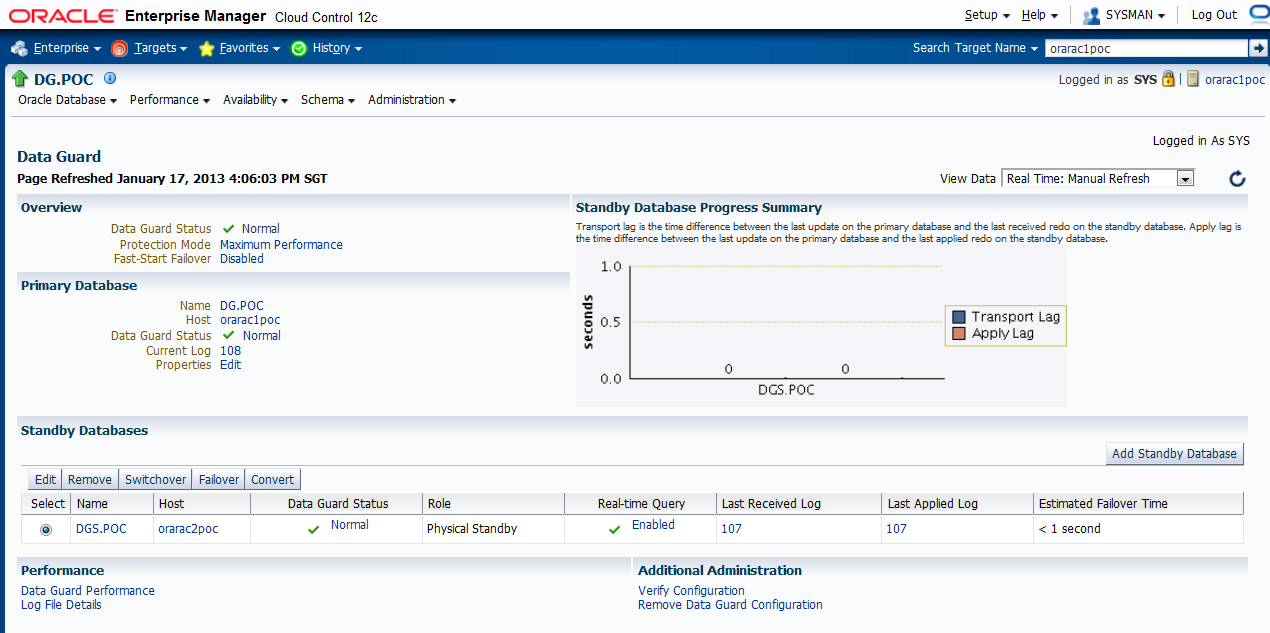
configure EM 12c to monitor physical standby database
follow "27 Setting Up High Availability " in Oracle® Enterprise Manager Cloud Control Administrator's Guide
12c Release 2 (12.1.0.2)
"To allow Enterprise Manager to monitor a Physical Standby database
(which is typically in a mounted state), specify sysdba monitoring
privileges. This can be specified either during the Standby creation
wizard itself or post creation by modifying the Monitoring Configuration
for the standby database target."In my case, DG is primary database , and DGS is the standby database.


as suggested, I provided sys password here. sysdba(sys) or sysoper account is preferred credential for monitoring metric / reconfigure database, as Mounted / standby database can't be monitored by normal user. I think in production, some IT security may require change sys password regularly .


- Verify the Physical Standby
Verify the Physical Standby database through the Enterprise Manager Console. Click the Log Switch button on the Data Guard page to switch log and verify that it is received and applied to the standby database.

Initializing
Connected to instance orarac1poc:DG
Starting alert log monitor...
Updating Data Guard link on database homepage...
WARNING: Broker name (dg) and target name (DG.POC) do not match.
WARNING: The broker name will be renamed to match the target name.
WARNING: Broker name (dgs) and target name (DGS.POC) do not match.
WARNING: The broker name will be renamed to match the target name.
Skipping verification of fast-start failover static services check.
Data Protection Settings:
Protection mode : Maximum Performance
Redo Transport Mode settings:
dg: ASYNC
dgs: ASYNC
Checking standby redo log files.....not checked due to broker name mismatch. Run verify again.
Checking Data Guard status
dg : Normal
dgs : Normal
Checking inconsistent properties
Checking agent status
WARNING: No credentials available for target. orarac1poc
Attempting agent ping ... Down
WARNING: No credentials available for target. orarac2poc
Attempting agent ping ... Down
Processing completed.


Subscribe to:
Posts (Atom)

