Showing posts with label cloud control. Show all posts

Friday, May 27, 2016

data guard SwitchOver using cloud control

When encounter this message in cloud control "You must reconnect to the current standby apply instance to perform the operation".

This means I have to connect to standby database as target, before the switch over can be performed. As currently I am connecting to primary database as target, which is not correct. 

wrong agent token when start cloud control agent

[symptoms]

orarac2poc:ORCL2:/home/oracle> . ./oms_agent_env
orarac2poc:ORCL2:/home/oracle> $AGENT_HOME/bin/emctl start agent
Oracle Enterprise Manager Cloud Control 12c Release 2
Copyright (c) 1996, 2012 Oracle Corporation.  All rights reserved.
Starting agent .................................. failed.
Target Manager failed at Startup: targets.xml was rejected: loaded with a wrong agent token
Consult emctl.log and emagent.nohup in: /u01/app/oracle/agent12c/agent_inst/sysman/log


error message in emctl.log

UID        PID  PPID  C STIME TTY          TIME CMD
oracle   32708 29131  0 11:28 pts/3    00:00:00 /bin/sh -f /u01/app/oracle/agent12c/core/12.1.0.2.0/bin/emctl start agent

----
32717 :: Fri May 27 11:28:34 2016::EM_SECURE_HOSTNME: orarac2poc
32717 :: Fri May 27 11:28:34 2016::EM_SECURE_PORT: 3872
32717 :: Fri May 27 11:28:34 2016::EM_LISTEN_ON_ALL_NICS: true
32717 :: Fri May 27 11:28:36 2016::AgentLifeCycle.pm:status agent returned with retCode=1
32758 :: Fri May 27 11:28:36 2016::AgentLifeCycle.pm: Launching the watchdog process.
32758 :: Fri May 27 11:28:37 2016::TZ = Asia/Singapore, Read = Asia/Singapore. Found = 1.
32758 :: Fri May 27 11:28:37 2016::agentTZRegion successfully validated.
32758 :: Fri May 27 11:28:37 2016::AgentTuning.pm: Launching emdctl with -Xmx1024m
32758 :: Fri May 27 11:28:38 2016::AgentStatus.pm:emdctl run_autotune returned 0
32717 :: Fri May 27 11:28:36 2016::AgentLifeCycle.pm: Launched the watchdog process pid=32758
32717 :: Fri May 27 11:28:36 2016::AgentLifeCycle.pm: StartCEMD start retryCount=120
32717 :: Fri May 27 11:28:53 2016::AgentLifeCycle.pm: StartCEMD status message file detected
32717 :: Fri May 27 11:28:53 2016::Found Msg file with: {1464319733039,initializing}
32717 :: Fri May 27 11:28:53 2016::AgentLifeCycle.pm: StartCEMD Querying for the real status of the agent
32717 :: Fri May 27 11:28:57 2016::AgentLifeCycle.pm: StartCEMD status message file detected
32717 :: Fri May 27 11:28:57 2016::Found Msg file with: {1464319733039,initializing}
32717 :: Fri May 27 11:28:57 2016::AgentLifeCycle.pm: StartCEMD Querying for the real status of the agent
32717 :: Fri May 27 11:29:00 2016::AgentLifeCycle.pm:Watch dog processs id: 32758 exited with an exit code of 55
32717 :: Fri May 27 11:29:00 2016::AgentLifeCycle.pm: Exited loop retryCount=103 with retCode=1
32717 :: Fri May 27 11:29:00 2016::AgentLifeCycle.pm: StartCEMD Querying for the real status of the agent
32717 :: Fri May 27 11:29:02 2016::AgentLifeCycle.pm: Check agent status retCode=1
32717 :: Fri May 27 11:29:02 2016::TZ: EmctlLogAvailabilityMarker Operation=start Diag=failed


error message in emagent.nohup

 -----
 --- EMState agent
----- Fri May 27 11:28:37 2016::32758::Auto tuning the agent at time Fri May 27 11:28:37 2016 -----
----- Fri May 27 11:28:38 2016::32758::Finished auto tuning the agent at time Fri May 27 11:28:38 2016 -----
----- Fri May 27 11:28:38 2016::32758::Launching the JVM with following options: -Xmx140M -XX:MaxPermSize=96M -server -Djava.security.egd=file:///dev/./urandom -Dsun.lang.ClassLoader.allowArraySyntax=true -XX:+UseLinuxPosixThreadCPUClocks -XX:+UseConcMarkSweepGC -XX:+CMSClassUnloadingEnabled -XX:+UseCompressedOops -----
----- Fri May 27 11:28:38 2016::337::Time elapsed between Launch of Watchdog process and execing EMAgent is 2 secs -----
----- Fri May 27 11:28:38 2016::32758::Agent Launched with PID 337 at time Fri May 27 11:28:38 2016 -----
2016-05-27 11:28:39,131 [1:main] WARN - Missing filename for log handler 'wsm'
2016-05-27 11:28:39,141 [1:main] WARN - Missing filename for log handler 'opss'
2016-05-27 11:28:39,142 [1:main] WARN - Missing filename for log handler 'opsscfg'
----- Fri May 27 11:28:58 2016::32758::Checking status of EMAgent : 337 -----
----- Fri May 27 11:28:58 2016::32758::EMAgent exited at Fri May 27 11:28:58 2016 with return value 55. -----
----- Fri May 27 11:28:58 2016::32758::EMAgent has exited due to initialization failure. -----
----- Fri May 27 11:28:58 2016::32758::Stopping other components. -----
----- Fri May 27 11:28:58 2016::32758::Commiting Process death. -----
----- Fri May 27 11:28:58 2016::32758::Generating additional diagnostics for 337 -----
----- Fri May 27 11:28:58 2016::32758::Generating openfiles report in /u01/app/oracle/agent12c/agent_inst/sysman/log/lsof_337 -----
----- Fri May 27 11:28:58 2016::32758::Generating netstat report in /u01/app/oracle/agent12c/agent_inst/sysman/log/netstat_337 -----
----- Fri May 27 11:28:59 2016::32758::Generating all host processes report in /u01/app/oracle/agent12c/agent_inst/sysman/log/allprocesses_337 -----
----- Fri May 27 11:28:59 2016::32758::Exiting watchdog loop
targets.xml was rejected: loaded with a wrong agent token


when configure recovery catalog in cloud control

Validation Error
Examine and correct the following errors, then retry the operation:
Host Credentials - unable to connect to the agent at https://orarac2poc:3872/emd/main/ [Connection refused]


[solution]

found the advice in https://community.oracle.com/thread/3674803?start=0&tstart=0

--> Move your existing target.xml file
mv target.xml target.xml.old


--> Create an empty targets.xml file under /AGENT_INST/sysman/emd with the below content


--> Start the agent


$AGENT_INST/bin/emctl start agent
This starts agent but without any targets populated in targets.xml


To discover targets perform agent resynchronization operation from console


orarac2poc:ORCL2:/u01/app/oracle/agent12c/agent_inst/sysman/emd> cat targets.xml


...


orarac2poc:ORCL2:/u01/app/oracle/agent12c/agent_inst/sysman/emd> mv  targets.xml targets.xml.bak
orarac2poc:ORCL2:/u01/app/oracle/agent12c/agent_inst/sysman/emd> vi targets.xml
orarac2poc:ORCL2:/u01/app/oracle/agent12c/agent_inst/sysman/emd> cat targets.xml


orarac2poc:ORCL2:/u01/app/oracle/agent12c/agent_inst/sysman/emd> $AGENT_HOME/bin/emctl start agent
Oracle Enterprise Manager Cloud Control 12c Release 2
Copyright (c) 1996, 2012 Oracle Corporation.  All rights reserved.
Starting agent .............. started.


[VERIFICATION]

orarac2poc:ORCL2:/u01/app/oracle/agent12c/agent_inst/sysman/emd> netstat -an |grep 3872 |grep LIST
tcp        0      0 :::3872                     :::*                        LISTEN
unix  2      [ ACC ]     STREAM     LISTENING     397387209 /var/tmp/.oracle/sOracle_CSS_LclLstnr_clus_2
unix  2      [ ACC ]     STREAM     LISTENING     397387213 /var/tmp/.oracle/sOCSSD_LL_orarac2poc_clus


orarac2poc:ORCL2:/u01/app/oracle/agent12c/agent_inst/sysman/emd> cat targets.xml


AND after I add one database as managed target in cloud control, I notice the content of targets.xml got changed.


after a while ,prompt RCAT


orarac2poc:ORCL2:/u01/app/oracle/agent12c/agent_inst/sysman/emd> cat targets.xml


Wednesday, September 04, 2013

12c cloud control log file housekeep.

orarac2poc:ORCL2:/home/oracle> df -k
Filesystem           1K-blocks      Used Available Use% Mounted on
/dev/mapper/VolGroup00-LogVol00
                      16220072   8313944   7068908  55% /
/dev/sda1               101086     21079     74788  22% /boot
tmpfs                  2097152   1169780    927372  56% /dev/shm
/dev/sdb1             36116556  33641364    640572  99% /u01

Googled, followed this article , and did minor enhancement for cron.

#!/bin/sh

export OMS_HOME=/u01/app/oracle/oms12c
export AGENT_HOME=/u01/app/oracle/agent12c

#find and clean Oracle 12c Agent log files older then 14 days
find ${AGENT_HOME}/agent_inst/sysman/log/ -name "gcagent.log.*" -mtime +14 -print|xargs rm >/dev/null 2>/dev/null

#find and clean Oracle 12c OMS log files older then 14 days
find ${OMS_HOME}/gc_inst/em/EMGC_OMS1/sysman/log/ -name "emoms.trc*" -mtime +14 -print|xargs rm  >/dev/null 2>/dev/null
find ${OMS_HOME}/gc_inst/em/EMGC_OMS1/sysman/log/ -name "emctl.log.*" -mtime +14 -print|xargs rm >/dev/null 2>/dev/null
find ${OMS_HOME}/gc_inst/em/EMGC_OMS1/sysman/log/ -name "oms_diag_info*.msg" -mtime +14 -print|xargs rm >/dev/null 2>/dev/null


#find and clean Oracle 12c Oracle HTTP Server (OHS) log files older then 14 days
find ${OMS_HOME}/gc_inst/WebTierIH1/diagnostics/logs/OHS/ohs1/  -name "access_log*" -mtime +14 -print|xargs rm >/dev/null 2>/dev/null
find ${OMS_HOME}/gc_inst/WebTierIH1/diagnostics/logs/OHS/ohs1/  -name "em_upload_https_access_log*" -mtime +14 -print|xargs rm >/dev/null 2>/dev/null
find ${OMS_HOME}/gc_inst/WebTierIH1/diagnostics/logs/OHS/ohs1/  -name "ohs1-*.log" -mtime +14 -print|xargs rm >/dev/null 2>/dev/null

#find and clean Oracle 12c Oracle WebLogic log files older then 14 days
find ${OMS_HOME}/gc_inst/user_projects/domains/GCDomain/servers/EMGC_OMS1/logs/ -name "access.log*" -mtime +14 -print|xargs rm  >/dev/null 2>/dev/null
find ${OMS_HOME}/gc_inst/user_projects/domains/GCDomain/servers/EMGC_OMS1/logs/ -name "EMGC_OMS1.log*" -mtime +14 -print|xargs rm >/dev/null 2>/dev/null
find ${OMS_HOME}/gc_inst/user_projects/domains/GCDomain/servers/EMGC_OMS1/logs/ -name "EMGC_OMS1.out*" -mtime +14 -print|xargs rm >/dev/null 2>/dev/null
find ${OMS_HOME}/gc_inst/user_projects/domains/GCDomain/servers/EMGC_OMS1/logs/ -name "EMGC_OMS1-diagnostic*.log" -mtime +14 -print|xargs rm >/dev/null 2>/dev/null
find ${OMS_HOME}/gc_inst/user_projects/domains/GCDomain/servers/EMGC_ADMINSERVER/logs -name "EMGC_ADMINSERVER.out*" -mtime +14 -print|xargs rm >/dev/null 2>/dev/null
find ${OMS_HOME}/gc_inst/user_projects/domains/GCDomain/servers/EMGC_ADMINSERVER/logs -name "GCDomain.log*" -mtime +14 -print|xargs rm >/dev/null 2>/dev/null

#find and clean Oracle 12c OPMN log files older then 14 days
#${OMS_HOME}/gc_inst/WebTierIH1/diagnostics/logs/OPMN/opmn

#find and clean Oracle 12c diagnose folder in oracle home log files older then 14 days
#find /home/oracle/oradiag_oracle/diag/clients/user_oracle/host_1387324873_11/alert  -name "log_*.xml" -mtime +14 -print|xargs rm

#the next line is commented for know because on 12c I disabled the module according to metalink note:1396472.1
#cat /u01/oracle/gc_inst/WebTierIH1/diagnostics/logs/OHS/ohs1/mod_wl_ohs.log>/u01/oracle/gc_inst/WebTierIH1/diagnostics/logs/OHS/ohs1/mod_wl_ohs_$DATE_VAR.log >/u01/oracle/gc_inst/WebTierIH1/diagnostics/logs/OHS/ohs1/mod_wl_ohs.log


orarac2poc:ORCL2:/u01/app> df -k
Filesystem           1K-blocks      Used Available Use% Mounted on
/dev/mapper/VolGroup00-LogVol00
                      16220072   8314016   7068836  55% /
/dev/sda1               101086     21079     74788  22% /boot
tmpfs                  2097152   1169780    927372  56% /dev/shm
/dev/sdb1             36116556  31533108   2748828  92% /u01

I also followed below doc to refine the setting for this poc server.
12c Cloud Control: How to Enable Log Rotation Policy to Automatically Delete Older GCDomain.log, EMGC_ADMINSERVER.log and access.log Files? (Doc ID 1450535.1)

spent some time to find out the port number of weblogic administration console.  it is 7101 , not 7102 mentioned in above metalink doc.


orarac2poc:RCAT:/u01/app/oracle/oms12c> find ./ -name portlist.ini
./oms/install/portlist.ini
orarac2poc:RCAT:/u01/app/oracle/oms12c> cat ./oms/install/portlist.ini

orarac2poc:RCAT:/u01/app/oracle/oms12c> find ./ -name *.ini
./.gcinstall_temp/staticports.ini
./oracle_common/oui/oraparam.ini
./oracle_common/oui/clusterparam.ini
./oracle_common/OPatch/opatch.ini
./oracle_common/inventory/Templates/oui/oraparam.ini
./oracle_common/inventory/Templates/oui/clusterparam.ini
./oracle_common/inventory/Templates/OPatch/opatch.ini
./Oracle_WT/oui/oraparam.ini
./Oracle_WT/oui/clusterparam.ini
./Oracle_WT/OPatch/opatch.ini
./Oracle_WT/inventory/Templates/oui/oraparam.ini
./Oracle_WT/inventory/Templates/oui/clusterparam.ini
./Oracle_WT/inventory/Templates/OPatch/opatch.ini
./oms/install/portlist.ini
./oms/install/installer/oraparam.ini
./oms/oui/oraparam.ini
./oms/oui/clusterparam.ini
./oms/OPatch/opatch.ini
./oms/inventory/Scripts/ext/lib/portrange.ini
./oms/inventory/Scripts/ext/lib/portrange_upgrade.ini
./oms/inventory/backup/2013-01-15_04-39-32-PM/Scripts/ext/lib/portrange.ini
./oms/inventory/backup/2013-01-15_04-39-32-PM/Scripts/ext/lib/portrange_upgrade.ini
./oms/inventory/Templates/install/installer/oraparam.ini
./oms/inventory/Templates/oui/oraparam.ini
./oms/inventory/Templates/oui/clusterparam.ini
./oms/inventory/Templates/OPatch/opatch.ini
./jdk16/inventory/Scripts/ext/lib/portrange.ini
./jdk16/inventory/Scripts/ext/lib/portrange_upgrade.ini
./jdk16/inventory/backup/2013-01-15_04-28-26PM/Scripts/ext/lib/portrange.ini
./jdk16/inventory/backup/2013-01-15_04-28-26PM/Scripts/ext/lib/portrange_upgrade.ini


orarac2poc:RCAT:/u01/app/oracle/oms12c> cat ./.gcinstall_temp/staticports.ini
Enterprise Manager Upload Http Port=4889
Enterprise Manager Upload Http SSL Port=4900
Enterprise Manager Central Console Http SSL Port=7799
Node Manager Http SSL Port=7403
Managed Server Http Port=7202
Enterprise Manager Central Console Http Port=7788
Oracle Management Agent Port=3872
Admin Server Http SSL Port=7101
Managed Server Http SSL Port=7301

https://10.139.90.42:7101/console

Thursday, January 24, 2013

Start OEM 12c manually

It takes long time to boot up the Linux.

Hence, to start manually, just comment /etc/oragchomelist.

[root@grid12c ~]# cat /etc/oragchomelist
#/u01/app/oracle/oms12cr2/oms
#/u01/app/oracle/agent12cr2/core/12.1.0.2.0

In that way, even if gcstartup execute, it does nothing.

[root@grid12c ~]# /etc/init.d/gcstartup start
[root@grid12c ~]#

Ref here:


Tuesday, January 22, 2013

remove physical standby database using 12c cloud control


1. a few click in EM1c.


2. The most important part is after removed standby. Now go back to primary and switch logfile, but it hangs in sql*plus.

TNS-12564: TNS:connection refused
    ns secondary err code: 0
    nt main err code: 0
    nt secondary err code: 0
    nt OS err code: 0
Error 12528 received logging on to the standby
PING[ARC1]: Heartbeat failed to connect to standby 'dgs'. Error is 12528.
Mon Jan 21 17:56:38 2013
Using STANDBY_ARCHIVE_DEST parameter default value as /u01/oradata/DG/arch
ALTER SYSTEM SET log_archive_dest_state_2='ENABLE' SCOPE=BOTH;
ALTER SYSTEM ARCHIVE LOG
ARCH: LGWR is actively archiving destination LOG_ARCHIVE_DEST_2
Mon Jan 21 17:57:16 2013
ARC0: Becoming the 'no SRL' ARCH
Mon Jan 21 17:57:17 2013
ARC2: Becoming the 'no SRL' ARCH
...
ARCa: Becoming the 'no SRL' ARCH
Mon Jan 21 18:01:07 2013
Starting background process SMCO
Mon Jan 21 18:01:07 2013
SMCO started with pid=64, OS id=16823
Mon Jan 21 18:02:16 2013
ARC0: LGWR is actively archiving destination LOG_ARCHIVE_DEST_2
ARCH: Archival stopped, error occurred. Will continue retrying
ORACLE Instance DG - Archival Error
ORA-16014: log 1 sequence# 183 not archived, no available destinations
ORA-00312: online log 1 thread 1: '/u01/oradata/DG/redo01.log'


When startup again, it crashes immediately.


SYS@DG> select * from v$log;

    GROUP#    THREAD#  SEQUENCE#      BYTES  BLOCKSIZE    MEMBERS ARC STATUS           FIRST_CHANGE# FIRST_TIM NEXT_CHANGE#
---------- ---------- ---------- ---------- ---------- ---------- --- ---------------- ------------- --------- ------------
NEXT_TIME
---------
         1          1        183   52428800        512          1 NO  INACTIVE               3680301 21-JAN-13      3680304
21-JAN-13

         2          1        184   52428800        512          1 NO  INACTIVE               3680304 21-JAN-13      3680468
21-JAN-13

         3          1        185   52428800        512          1 NO  CURRENT                3680468 21-JAN-13   2.8147E+14


SYS@DG> alter system switch logfile;
alter system switch logfile
*
ERROR at line 1:
ORA-01013: user requested cancel of current operation


SYS@DG> shutdown immediate
Database closed.
Database dismounted.
ORACLE instance shut down.
SYS@DG> startup
ORACLE instance started.

Total System Global Area  680607744 bytes
Fixed Size                  2229600 bytes
Variable Size             419433120 bytes
Database Buffers          251658240 bytes
Redo Buffers                7286784 bytes
Database mounted.
ORA-03113: end-of-file on communication channel
Process ID: 18386
Session ID: 12 Serial number: 3


Starting background process RVWR
Tue Jan 22 09:47:37 2013
RVWR started with pid=26, OS id=16478
Database mounted in Exclusive Mode
Lost write protection disabled
WARNING: No local destinations have been defined for
         archival of the Redo Log.
Completed: ALTER DATABASE   MOUNT
Tue Jan 22 09:47:37 2013
ALTER DATABASE OPEN
LGWR: STARTING ARCH PROCESSES
Tue Jan 22 09:47:37 2013
ARC0 started with pid=27, OS id=16481
ARC0: Archival started
LGWR: STARTING ARCH PROCESSES COMPLETE
ARC0: STARTING ARCH PROCESSES
Tue Jan 22 09:47:38 2013
ARC1 started with pid=28, OS id=16485
Tue Jan 22 09:47:38 2013
ARC2 started with pid=29, OS id=16487
Errors in file /u01/app/oracle/diag/rdbms/dg/DG/trace/DG_ora_16479.trc:
ORA-16014: log 1 sequence# 1 not archived, no available destinations
ORA-00312: online log 1 thread 1: '/u01/oradata/DG/redo01.log'
USER (ospid: 16479): terminating the instance due to error 16014
System state dump requested by (instance=1, osid=16479), summary=[abnormal instance termination].
System State dumped to trace file /u01/app/oracle/diag/rdbms/dg/DG/trace/DG_diag_16422.trc
Tue Jan 22 09:47:39 2013
License high water mark = 2
Dumping diagnostic data in directory=[cdmp_20130122094739], requested by (instance=1, osid=16479), summary=[abnormal instance termination].
Instance terminated by USER, pid = 16479
USER (ospid: 16495): terminating the instance
Instance terminated by USER, pid = 16495

#trace file content

Trace file /u01/app/oracle/diag/rdbms/dg/DG/trace/DG_ora_16479.trc
Oracle Database 11g Enterprise Edition Release 11.2.0.2.0 - 64bit Production
With the Partitioning, Real Application Clusters, OLAP, Data Mining
and Real Application Testing options
ORACLE_HOME = /u01/app/oracle/product/11.2.0/db_2
System name:    Linux
Node name:      orarac1poc
Release:        2.6.18-238.el5
Version:        #1 SMP Sun Dec 19 14:22:44 EST 2010
Machine:        x86_64
VM name:        VMWare Version: 6
Instance name: DG
Redo thread mounted by this instance: 1
Oracle process number: 25
Unix process pid: 16479, image: oracle@orarac1poc (TNS V1-V3)


*** 2013-01-22 09:47:38.586
*** SESSION ID:(125.5) 2013-01-22 09:47:38.586
*** CLIENT ID:() 2013-01-22 09:47:38.586
*** SERVICE NAME:() 2013-01-22 09:47:38.586
*** MODULE NAME:(sqlplus@orarac1poc (TNS V1-V3)) 2013-01-22 09:47:38.586
*** ACTION NAME:() 2013-01-22 09:47:38.586

Initial buffer sizes: read 1024K, overflow 832K, change 805K
Log read is SYNCHRONOUS though disk_asynch_io is enabled!
DDE rules only execution for: ORA 312
----- START Event Driven Actions Dump ----
---- END Event Driven Actions Dump ----
----- START DDE Actions Dump -----
Executing SYNC actions
----- START DDE Action: 'DB_STRUCTURE_INTEGRITY_CHECK' (Async) -----
Successfully dispatched
----- END DDE Action: 'DB_STRUCTURE_INTEGRITY_CHECK' (SUCCESS, 0 csec) -----
Executing ASYNC actions
----- END DDE Actions Dump (total 0 csec) -----
ORA-16014: log 1 sequence# 1 not archived, no available destinations
ORA-00312: online log 1 thread 1: '/u01/oradata/DG/redo01.log'
kjzduptcctx: Notifying DIAG for crash event
----- Abridged Call Stack Trace -----
ksedsts()+461<-kjzdssdmp adbdrv="" br="" kcfopd="" kjzdicrshnfy="" kjzduptcctx="" kpoal8="" kpooprx="" ksuitm="" opidrv="" opiexe="" opiino="" opiodr="" opiosq0="" opitsk="" ttcpip=""><-sou2o br="" opimai_real="" ssthrdmain="">----- End of Abridged Call Stack Trace -----

*** 2013-01-22 09:47:38.905
USER (ospid: 16479): terminating the instance due to error 16014
ksuitm: waiting up to [5] seconds before killing DIAG(16422)


3. The solution is to remove those parameters related to standby database.
orarac1poc:DG:/u01/app/oracle/product/11.2.0/db_2/dbs> diff initDG.ora initDG.ora.bak

 #*.LOG_ARCHIVE_CONFIG='DG_CONFIG=(DG,DGS)'
 #*.log_archive_dest_2='service="dgs"','LGWR ASYNC NOAFFIRM delay=0 optional compression=disable max_failure=0 max_connections=1 reopen=300 db_unique_name="dgs" net_timeout=30','valid_for=(all_logfiles,primary_role)'
 #DG.log_archive_dest_3='location="/u01/oradata/DG/arch"',' valid_for=(STANDBY_LOGFILE,STANDBY_ROLE)'
 #*.log_archive_dest_state_2='ENABLE'
 #DG.log_archive_dest_state_3='ENABLE'


SYS@DG> alter database open;

Database altered.

SYS@DG> alter system checkpoint;

System altered.

SYS@DG> show parameter log_archive_dest

NAME                                 TYPE        VALUE
------------------------------------ ----------- ------------------------------
log_archive_dest                     string
log_archive_dest_1                   string      LOCATION=USE_DB_RECOVERY_FILE_
                                                 DEST VALID_FOR=(ALL_LOGFILES,A
                                                 LL_ROLES) DB_UNIQUE_NAME=DG
log_archive_dest_2                   string
log_archive_dest_3                   string
log_archive_dest_state_1             string      ENABLE
log_archive_dest_state_2             string      enable
log_archive_dest_state_3             string      enable
...

SYS@DG> shutdown immediate
Database closed.
Database dismounted.
ORACLE instance shut down.
SYS@DG> startup
ORACLE instance started.

Total System Global Area  680607744 bytes
Fixed Size                  2229600 bytes
Variable Size             419433120 bytes
Database Buffers          251658240 bytes
Redo Buffers                7286784 bytes
Database mounted.
Database opened.

Monday, January 21, 2013

Remove a database target in 12c Cloud Control


As I have CPU issue with physical standby database in previous post, I have to remove it before I have the solution.
In 12c Enterprise Manager, from "Targets" click "all targets" or "Database Instances", then choose the target and right click , "Target Setup / Remove Target ", quite straightforward. 


Excessive cpu from physical standby database monitored by EM 12c

Added 11.2..0.2 data guard to EM 12c , but next day I always found the CPU utilization is almost 100%.
The load of uptime can be more than 20 for a two-core VM server.

Managed to check the MODULE name of active session, most of which are emagent_SQL_oracle_database and Oracle Enterprise Manager.Metric Engine.

Did quick check on metalink, found one similar case reported in 10.2.0.5. 
 Grid Control Agent Consumes High CPU when Monitoring Standby RAC Databases [ID 864829.1]

Anyone has similar experience with mine ? Hope it is not an old bug in 12.1.0.2 EM Cloud control.

As workaround, I have to remove the physical standby database from 12c Cloud control.

Friday, January 18, 2013

Clean up after failure installation of EM 12c cloud control


When fails half way during installation of 12c Cloud Control, of course, we'd better to check logs under /u01/app/oraInventory/logs/emdbprereqs/LATEST to understand what is going wrong.
e.g
Executing Prereq Action
-----------------------------
executing Action: SELECT COUNT(1) FROM ALL_USERS WHERE USERNAME in ('SYSMAN_MDS', 'MGMT_VIEW', 'SYSMAN_BIP','SYSMAN_APM','BIP', 'SYSMAN_OPSS', 'SYSMAN_RO')
output: 1

Prerequisite failed

After fix the issue mentioned in log files, in order to re-install it, other than follow "15 Deinstalling Enterprise Manager (Single and Multi-OMS Environments)" in Oracle® Enterprise Manager Cloud Control Advanced Installation and Configuration Guide
12c Release 2 (12.1.0.2).


Next, we also need to drop objects created in repository database.

Below commands may help.

select count(1) from dba_synonyms where table_owner in ('SYSMAN','SYSMAN_MDS','MGMT_VIEW','SYSMAN_BIP','SYSMAN_APM','BIP','SYSMAN_OPSS','SYSMAN_RO')
-- Generate drop synonyms scripts
select 'drop public synonym '|| synonym_name || ' ;'  from dba_synonyms where table_owner in ('SYSMAN','SYSMAN_MDS','MGMT_VIEW','SYSMAN_BIP','SYSMAN_APM','BIP','SYSMAN_OPSS','SYSMAN_RO') and owner='PUBLIC';


select 'drop synonym '|| OWNER||'.'||synonym_name || ' ;'  from dba_synonyms where table_owner in ('SYSMAN','SYSMAN_MDS','MGMT_VIEW','SYSMAN_BIP','SYSMAN_APM','BIP','SYSMAN_OPSS','SYSMAN_RO') and owner<>'PUBLIC';


drop user SYSMAN_MDS cascade;
drop user MGMT_VIEW cascade;
drop user SYSMAN_BIP cascade;
drop user SYSMAN_APM cascade;
drop user BIP cascade;
drop user SYSMAN_OPSS cascade;
drop user SYSMAN_RO cascade;
drop user SYSMAN cascade;


 drop tablespace MGMT_ECM_DEPOT_TS including contents and datafiles;

 drop tablespace MGMT_TABLESPACE including contents and datafiles;

 drop tablespace MGMT_AD4J_TS  including contents and datafiles;


Thursday, January 17, 2013

Configuring ASM Targets for Monitoring

According to 

G Configuring Database and ASM Targets for Monitoring


  1. Set the monitoring credentials for Oracle ASM. To do so, follow these steps:
    1. In Grid Control, click Targets and then Databases.
    2. On the Databases page, find and select the Oracle ASM target and click Monitoring Configuration.
    3. On the Properties page, specify the password for the ASMSYS user in the Password field. To verify the monitoring credentials, click Test Connection.
    4. If the connection is successful, click Next, then click Submit.


I  found the solution for EM 12c Cloud Control to monitor RAC ASM instances.

[grid@orarac2poc admin]$ cat tnsnames.ora
+ASM2 =
  (DESCRIPTION =
    (ADDRESS = (PROTOCOL = TCP)(HOST = orarac2poc)(PORT = 1521))
    (CONNECT_DATA =
      (SERVER = DEDICATED)
      (SERVICE_NAME = +ASM)
      (INSTANCE_NAME=+ASM2)(UR=A)
    )
  )


[grid@orarac2poc admin]$ lsnrctl service LISTENER

LSNRCTL for Linux: Version 11.2.0.2.0 - Production on 17-JAN-2013 15:00:55

Copyright (c) 1991, 2010, Oracle.  All rights reserved.

Connecting to (DESCRIPTION=(ADDRESS=(PROTOCOL=IPC)(KEY=LISTENER)))
Services Summary...
Service "+ASM" has 1 instance(s).
  Instance "+ASM2", status READY, has 1 handler(s) for this service...
    Handler(s):
      "DEDICATED" established:0 refused:0 state:ready
         LOCAL SERVER
Service "DGS.POC" has 1 instance(s).
  Instance "DGS", status READY, has 1 handler(s) for this service...
    Handler(s):
      "DEDICATED" established:19 refused:0 state:ready
         LOCAL SERVER
Service "DGS_DGB.POC" has 1 instance(s).
  Instance "DGS", status READY, has 1 handler(s) for this service...
    Handler(s):
      "DEDICATED" established:19 refused:0 state:ready
         LOCAL SERVER
Service "DGS_DGMGRL.POC" has 1 instance(s).
  Instance "DGS", status UNKNOWN, has 1 handler(s) for this service...
    Handler(s):
      "DEDICATED" established:0 refused:0
         LOCAL SERVER
Service "DGXDB.POC" has 1 instance(s).
  Instance "DGS", status READY, has 1 handler(s) for this service...
    Handler(s):
      "D000" established:0 refused:0 current:0 max:1022 state:ready
         DISPATCHER
         (ADDRESS=(PROTOCOL=tcp)(HOST=orarac2poc)(PORT=16735))
Service "ORCL" has 1 instance(s).
  Instance "ORCL2", status READY, has 1 handler(s) for this service...
    Handler(s):
      "DEDICATED" established:90 refused:0 state:ready
         LOCAL SERVER
Service "ORCLXDB" has 1 instance(s).
  Instance "ORCL2", status READY, has 1 handler(s) for this service...
    Handler(s):
      "D000" established:0 refused:0 current:0 max:1022 state:ready
         DISPATCHER
         (ADDRESS=(PROTOCOL=tcp)(HOST=orarac2poc)(PORT=65288))
Service "RCAT" has 1 instance(s).
  Instance "RCAT", status READY, has 1 handler(s) for this service...
    Handler(s):
      "DEDICATED" established:1327 refused:0 state:ready
         LOCAL SERVER
Service "RCATXDB" has 1 instance(s).
  Instance "RCAT", status READY, has 1 handler(s) for this service...
    Handler(s):
      "D000" established:0 refused:0 current:0 max:1022 state:ready
         DISPATCHER
         (ADDRESS=(PROTOCOL=tcp)(HOST=orarac2poc)(PORT=16926))
The command completed successfully


[grid@orarac2poc ~]$ sqlplus / as sysasm

SQL*Plus: Release 11.2.0.2.0 Production on Thu Jan 17 14:54:18 2013

Copyright (c) 1982, 2010, Oracle.  All rights reserved.


Connected to:
Oracle Database 11g Enterprise Edition Release 11.2.0.2.0 - 64bit Production
With the Real Application Clusters and Automatic Storage Management options

SQL> select * from v$pwfile_users;

USERNAME                       SYSDB SYSOP SYSAS
------------------------------ ----- ----- -----
SYS                            TRUE  TRUE  TRUE
ASMSNMP                        TRUE  FALSE FALSE

SQL> alter user asmsnmp identified by oracle123;

User altered.

SQL> exit
Disconnected from Oracle Database 11g Enterprise Edition Release 11.2.0.2.0 - 64bit Production
With the Real Application Clusters and Automatic Storage Management options


Disconnected from Oracle Database 11g Enterprise Edition Release 11.2.0.2.0 - 64bit Production
With the Real Application Clusters and Automatic Storage Management options
[grid@orarac2poc admin]$ sqlplus asmsnmp/oracle123@+ASM2  as sysasm

SQL*Plus: Release 11.2.0.2.0 Production on Thu Jan 17 15:04:08 2013

Copyright (c) 1982, 2010, Oracle.  All rights reserved.

ERROR:
ORA-01031: insufficient privileges


Enter user-name:
[grid@orarac2poc admin]$ sqlplus asmsnmp/oracle123@+ASM2  as sysdba

SQL*Plus: Release 11.2.0.2.0 Production on Thu Jan 17 15:04:12 2013

Copyright (c) 1982, 2010, Oracle.  All rights reserved.


Connected to:
Oracle Database 11g Enterprise Edition Release 11.2.0.2.0 - 64bit Production
With the Real Application Clusters and Automatic Storage Management options

SQL> exit
Disconnected from Oracle Database 11g Enterprise Edition Release 11.2.0.2.0 - 64bit Production
With the Real Application Clusters and Automatic Storage Management options


Can database console and cloud control co-exist ?

I found the answer is YES in my 11.2.0.2 RAC env , the 12c cloud control.  So we don't have drop local repository before install cloud control agent to the target host, except for the Cloud Control Repository database. 

:)

and I found if I stop dbconsole , it can save me 400+MB memory.

This is 12c cloud control screenshot.


And here is 11gR2 database control screenshot 


Monitor memory

orarac1poc:ORCL1:/home/oracle> ps -ef |grep dbcon
oracle   16750 15429  0 16:32 pts/4    00:00:00 grep dbcon
orarac1poc:ORCL1:/home/oracle> emctl start dbconsole
Oracle Enterprise Manager 11g Database Control Release 11.2.0.2.0
Copyright (c) 1996, 2010 Oracle Corporation.  All rights reserved.
https://orarac1poc:1158/em/console/aboutApplication
Starting Oracle Enterprise Manager 11g Database Control ...... started.
------------------------------------------------------------------
Logs are generated in directory /u01/app/oracle/product/11.2.0/db_2/orarac1poc_ORCL/sysman/log

[grid@orarac1poc admin]$ ps -ef |grep dbcon
grid     14790 22909  0 16:28 pts/1    00:00:00 grep dbcon
oracle   15362     1  0  2012 ?        00:02:10 /u01/app/oracle/product/11.2.0/db_2/perl/bin/perl /u01/app/oracle/product/11.2.0/db_2/bin/emwd.pl dbconsole /u01/app/oracle/product/11.2.0/db_2/orarac1poc_ORCL/sysman/log/emdb.nohup

orarac1poc:ORCL1:/home/oracle> emctl stop dbconsole
Oracle Enterprise Manager 11g Database Control Release 11.2.0.2.0
Copyright (c) 1996, 2010 Oracle Corporation.  All rights reserved.
https://orarac1poc:1158/em/console/aboutApplication
Stopping Oracle Enterprise Manager 11g Database Control ...
 ...  Stopped.


configure EM 12c to monitor physical standby database

follow "27 Setting Up High Availability " in Oracle® Enterprise Manager Cloud Control Administrator's Guide
12c Release 2 (12.1.0.2)

"To allow Enterprise Manager to monitor a Physical Standby database (which is typically in a mounted state), specify sysdba monitoring privileges. This can be specified either during the Standby creation wizard itself or post creation by modifying the Monitoring Configuration for the standby database target."

In my case, DG is primary database , and DGS is the standby database.


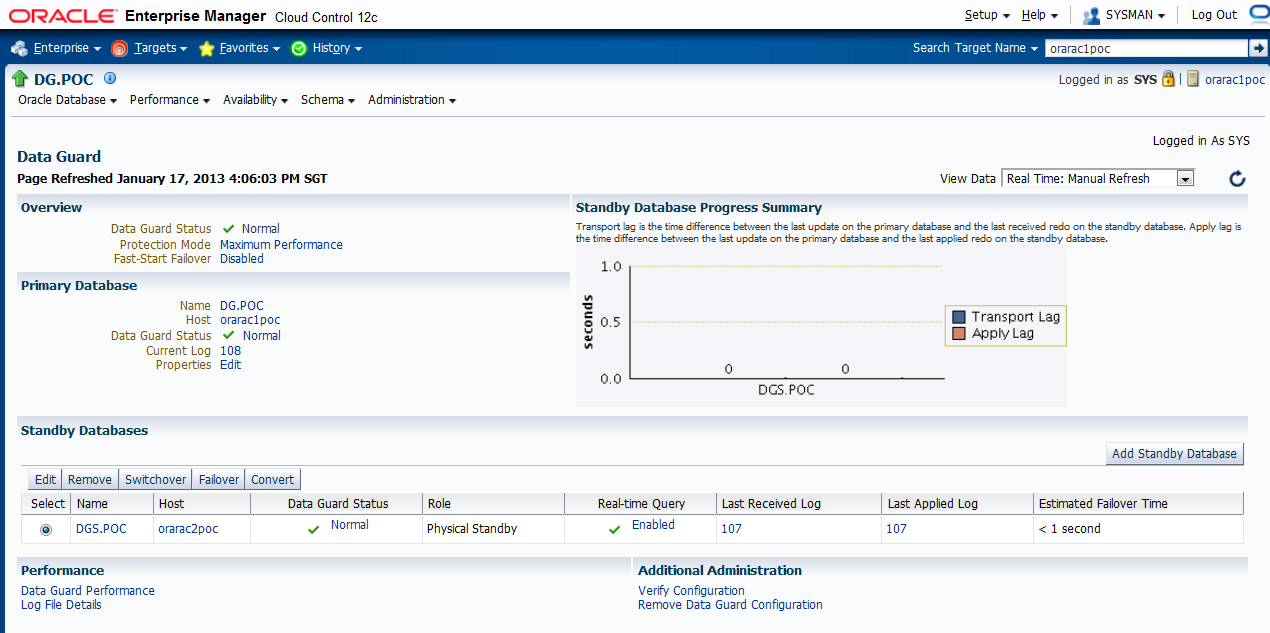
as suggested, I provided sys password here.  sysdba(sys) or sysoper account is preferred credential for monitoring metric / reconfigure database, as Mounted / standby database can't be monitored by normal user. I think in production, some IT security may require change sys password regularly .

  1. Verify the Physical Standby

    Verify the Physical Standby database through the Enterprise Manager Console. Click the Log Switch button on the Data Guard page to switch log and verify that it is received and applied to the standby database.


    Initializing
    Connected to instance orarac1poc:DG
    Starting alert log monitor...
    Updating Data Guard link on database homepage...
    WARNING: Broker name (dg) and target name (DG.POC) do not match.
    WARNING: The broker name will be renamed to match the target name.
    WARNING: Broker name (dgs) and target name (DGS.POC) do not match.
    WARNING: The broker name will be renamed to match the target name.
    Skipping verification of fast-start failover static services check.

    Data Protection Settings:
      Protection mode : Maximum Performance
      Redo Transport Mode settings:
        dg: ASYNC
        dgs: ASYNC

      Checking standby redo log files.....not checked due to broker name mismatch. Run verify again.

    Checking Data Guard status
      dg : Normal
      dgs : Normal

    Checking inconsistent properties

    Checking agent status
    WARNING: No credentials available for target. orarac1poc
     Attempting agent ping ... Down

    WARNING: No credentials available for target. orarac2poc
     Attempting agent ping ... Down


    Processing completed.